Top 10 Crypto Wallets for 2027: Mobile Security & Hardware Wallet Pairing Guide
Navigating Web3, DeFi, and cross-chain transfers requires a secure mobile wallet. Mobile convenience is unmatched, but it also introduces specific risks like phishing, SIM-swapping, and malicious smart contract approvals.
This definitive guide reviews the top 10 crypto wallets for 2027, details critical mobile security precautions, and shows you exactly how to pair a hardware wallet with a mobile app for maximum protection.
Complete Mobile Security Checklist: Protect Your Phone Before Transacting
Before installing a hot wallet or initiating transactions on iOS or Android, fortify your device. Software-based mobile wallets hold private keys locally, making phone-level security your first line of defense.
Mobile Security Checklist:
- 1 Enable Biometrics: Activate Face ID or Fingerprint locks for your wallet app and device.
- 2 Enforce OS Updates: Keep your operating system and apps updated for the latest security patches.
- 3 Isolate Your Recovery Phrase: Store it offline—never digitally.
- 4 Apply SIM-Swap Protections: Set a carrier port-out lock and ditch SMS-based 2FA.
- 5 Verify App Origin: Only download from official sources.
How to Fortify Your Mobile Wallet Security
- Enable Hardware Enclave Biometrics: Set up biometric locks inside your wallet app. Modern mobile OS isolates key generation inside a dedicated Secure Enclave hardware module.
- Never Save Seed Phrases Digitally: Do not screenshot, store in cloud notes, or copy your recovery phrase. Clipboard-sniffing malware can extract 12-to-24-word seed phrases. Write them on paper or stamp them into a steel backup.
- Guard Against SIM-Swapping: Secure your carrier account with a port-out PIN. Replace SMS-based two-factor authentication (2FA) with hardware security keys or authenticator apps.
- Audit Smart Contract Permissions: High-profile mobile wallets now feature built-in clear-signing and transaction simulation tools. Always inspect exact token allowances before confirming transactions.
- Verify App Source Authenticity: Download wallet applications exclusively through official project websites or verified app store listings to avoid malicious clone apps.
Quick Comparison: Top 10 Crypto Wallets for 2027
| Wallet | Type | Primary Best Use Case | Key Security Architecture |
|---|---|---|---|
| Trust Wallet | Mobile Hot Wallet | Multi-Chain & Mobile Staking | Local Encryption & Scam Scanner |
| Zengo | Mobile MPC | Seedless Onboarding & Beginners | 3-Factor MPC & Biometric FaceLock |
| Tangem | Hardware/Mobile Hybrid | Portable Daily Cold Storage | EAL6+ Chip Card via Mobile NFC |
| MetaMask | Extension & Mobile | EVM DeFi, dApps & Layer 2s | Self-Custodial Key Storage & Custom RPCs |
| Phantom | Extension & Mobile | Solana, Ethereum & Polygon NFTs | Real-Time Phishing & Simulation Warnings |
| Exodus | Mobile & Desktop | Beginner Multi-Asset Management | Self-Custodial Local Encrypted Storage |
| Ledger (Gen5 / Stax) | Hardware Wallet | High-Value Long-Term Cold Storage | EAL6+ Secure Element & NFC Clear Signing |
| Trezor (Safe 5) | Hardware Wallet | Open-Source Security Purists | Open-Source Firmware & Shamir Backup |
| Coinbase Wallet | Mobile Hot Wallet | Web3 dApp Interoperability & Passkeys | Passkey Support & On-Chain Simulation |
| BlueWallet | Mobile Bitcoin-Only | Fast Bitcoin & Lightning Payments | Open-Source, Multisig & Watch-Only |
Detailed Analysis: The Top 10 Crypto Wallets for 2027
1. Trust Wallet
Best For: Mobile-first users needing multi-chain access across 100+ blockchains.
Key Features: Integrated Web3 dApp browser, native token staking, in-app swaps, and NFT management.
Security Rating: High. Features an active Security Scanner to flag risky smart contracts before signing.
Pros: Supports millions of digital assets; completely open-source core framework.
Cons: Mobile interface can feel busy for pure buy-and-hold investors.
2. Zengo
Best For: Users seeking full self-custody without seed phrase vulnerability.
Key Features: Uses Multi-Party Computation (MPC) to split cryptographic keys between your device and secure servers.
Security Rating: Excellent. Removes the single point of failure inherent to traditional 12-word seed phrases.
Pros: Simple 3-Factor Recovery; built-in Web3 Firewall.
Cons: Advanced multi-sig features require a premium subscription tier.
3. Tangem Wallet
Best For: Self-custody with card-shaped hardware security.
Key Features: Credit-card-sized hardware units that connect to iOS or Android devices via NFC.
Security Rating: Very High. Monolithic EAL6+ microchip with no battery or physical ports to exploit.
Pros: Highly portable; fast tapping authorization on mobile screens.
Cons: Requires physical card interaction for every transaction confirmation.
4. MetaMask
Best For: EVM-compatible DeFi, Web3 platforms, and Ethereum Layer 2 ecosystems.
Key Features: Seamless sync between desktop and mobile, custom RPC support, and token bridging.
Security Rating: Moderate to High. Highly configurable, though vulnerable to phishing if users sign malicious dApp approvals.
Pros: The standard integration for almost every Ethereum-compatible dApp.
Cons: Native non-EVM chain support requires specific plugins or snaps.
5. Phantom
Best For: Solana ecosystem navigation alongside Ethereum and Polygon networks.
Key Features: Smooth UI, built-in staking, automatic token spam filtering, and cross-chain swaps.
Security Rating: High. Features real-time transaction simulation that shows expected balance changes before confirming trades.
Pros: Exceptional user interface for NFTs and micro-transactions.
Cons: Lacks deep support for UTXO-based chains like Bitcoin or Litecoin.
6. Exodus
Best For: Beginners looking for clean design and cross-device sync.
Key Features: Live portfolio charts, internal exchange router, and native hardware wallet integration.
Security Rating: Moderate. Self-custodial with local key encryption, though code is closed-source.
Pros: Intuitive layout; excellent built-in customer support resources.
Cons: In-app swap spreads can be higher than external DEXs.
7. Ledger (Gen5 / Stax Series)
Best For: Long-term cold storage of major asset holdings.
Key Features: Dedicated hardware signers with certified Secure Element chips, Bluetooth/NFC, and clear-signing screens.
Security Rating: Maximum. Offline private keys remain isolated from internet-connected devices.
Pros: Supports 5,500+ tokens; pairs directly with the Ledger Live mobile app.
Cons: Premium hardware purchase required.
8. Trezor (Safe 5)
Best For: Security auditors and open-source software enthusiasts.
Key Features: Fully open-source firmware and hardware, Shamir Backup, and color touchscreen interfaces.
Security Rating: Maximum. Auditable codebase verified by global cybersecurity communities.
Pros: Strong transparency track record; robust privacy tools.
Cons: Mobile integration requires a physical cable connection or Android WebUSB setup on select models.
9. Coinbase Wallet
Best For: Self-custody with Web2-style onboarding convenience.
Key Features: Standalone non-custodial wallet supporting passkey logins and human-readable usernames.
Security Rating: High. Cloud encrypted seed phrase backups secured by biometric passkeys.
Pros: Smooth transfer bridge between Coinbase Exchange and self-custody.
Cons: High reliance on cloud backup frameworks if recovery settings are misconfigured.
10. BlueWallet
Best For: Mobile-focused Bitcoin storage and rapid Lightning Network payments.
Key Features: Multi-sig vaults, plausible deniability (decoy wallets), and Lightning wallet hosting.
Security Rating: High. Completely open-source software focused strictly on Bitcoin network standards.
Pros: Advanced Bitcoin privacy features including coin control.
Cons: Purely single-asset focused; does not store EVM tokens or altcoins.
How to Set Up Your Mobile Crypto Wallet: A Step-by-Step Guide
- Download the Official App: Navigate directly to the wallet provider’s official domain or a verified app store link. Never download via third-party APK links.
- Initialize Self-Custody Keys: Select “Create a New Wallet” in a private location away from cameras.
- Secure the Recovery Phrase: Write down the 12-to-24-word phrase on paper or metal in exact order. Verify it within the app.
- Configure Biometrics & PIN: Set an in-app passcode and activate Face ID or fingerprint authentication for every transfer.
- Perform a Small Test Transaction: Deposit a small test amount (e.g., $5–$10) and test sending it out to confirm everything works correctly.
Step-by-Step: How to Pair a Hardware Wallet with a Mobile App
For high-value holdings, pairing a hardware wallet with your mobile app gives you the convenience of mobile monitoring with the security of offline private keys.
1. Download the Official Companion App & Update Firmware
Prepare both devices.
Download the verified mobile companion app, such as Ledger Live, Trezor Suite, Tangem, or Phantom. Ensure your hardware device is initialized with a PIN and that its firmware is fully updated.
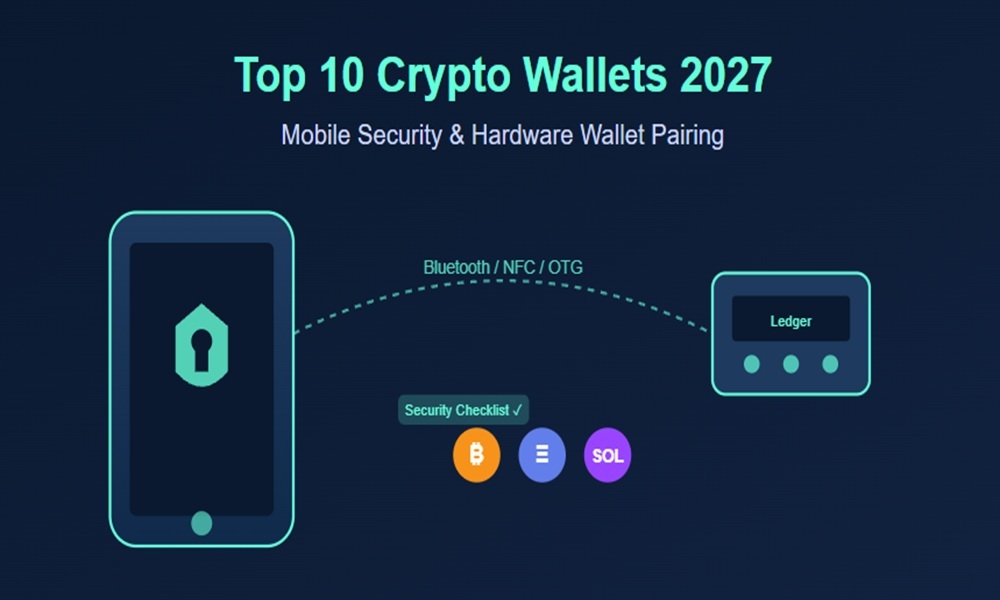
2. Enable Connection Mode: Bluetooth, NFC, or OTG
Establish the communication layer.
- Bluetooth (e.g., Ledger Stax / Nano X): Turn on Bluetooth in both your phone’s settings and inside the hardware device’s control menu.
- NFC (e.g., Tangem, Ledger Stax): Ensure NFC is active on your smartphone.
- USB-C / OTG Cable (e.g., Trezor Safe, Ledger via Cable): Connect the hardware device directly to your phone’s charging port using an OTG adapter cable.
3. Add Account / Connect Hardware Device
Synchronize public keys.
Open the mobile app and select “Add Account” or “Connect Hardware Wallet.” Unlock your physical hardware device by entering your security PIN on the device screen. Select the asset ecosystem you want to manage, such as Bitcoin, Ethereum, or Solana.
4. Confirm On-Device Pairing Request
Verify the device pair.
Your mobile app will display a pairing code or request authorization. Verify that the pairing code on your smartphone screen matches the code displayed on your hardware device. Accept the connection directly on the physical button or screen of the hardware wallet.
5. Test Clear-Signing a Transaction
Validate the signing flow.
The mobile app now functions in a “watch-only / draft” mode. Initiate a small test transaction on your phone. The phone sends the raw transaction data to your hardware wallet. Review the destination address and gas fee on the hardware screen, then physically press the device buttons to sign and authorize the transfer.
Key Rules for Mobile Cold Storage Security
- Private Keys Never Leave the Hardware: Your mobile phone only receives public addresses and sends unsigned transaction payloads. The private key never enters your phone’s memory or cloud storage.
- Always Practice Clear-Signing: Do not approve transactions if your mobile app and hardware screen show differing recipient addresses or contract details.
- Turn Off Bluetooth When Inactive: If using a Bluetooth-enabled hardware signer, disable Bluetooth on the physical device when you are not actively approving transfers.
Frequently Asked Questions (FAQ)
What is the primary difference between a hot wallet and a cold wallet?
A hot wallet (e.g., Trust Wallet, MetaMask) remains connected to the internet for immediate trading and DeFi. A cold wallet (e.g., Ledger, Trezor) stores private keys offline on dedicated hardware, isolating them from online threats.
Are mobile crypto wallets safe for large asset balances?
Mobile wallets are ideal for daily transactions and small-to-medium holdings. For significant capital, pairing your mobile app with a hardware cold storage device or using MPC key structures is highly recommended.
What happens if I lose my phone with my crypto wallet on it?
Your funds are on the blockchain, not on your phone. As long as you have your 12-to-24-word seed phrase or MPC recovery factors, you can restore access on a new device.
How do I pair a hardware wallet with my mobile app?
Download the official companion app, enable Bluetooth/NFC/OTG, connect the hardware device, confirm the pairing code on both screens, and test with a small clear-signed transaction.
Read More
best crypto wallets 2027, mobile crypto security, secure crypto wallet, hot wallet vs cold wallet, how to pair hardware wallet with mobile app. Trust Wallet review, MetaMask security, Ledger vs Trezor, Zengo MPC wallet, Phantom wallet guide, Bitcoin mobile wallet, Ledger Live mobile, Trezor Suite mobile, Coin Market Cap.